

Managing equipment and transactions digitally is the new normal in construction. But the more your team relies on digital workflows, the more important it becomes to protect data integrity and keep operations moving—even when disruptions happen. That’s exactly where document recovery comes in.
Within construction equipment management software, document recovery is a practical safeguard for transactional work. RentalResult’s document recovery feature is designed to prevent incomplete or interrupted documents from creating data loss, confusion, or duplicate work. Below, we’ll break down why it matters, how to use it, and when it becomes most valuable in real construction environments.
Why Document Recovery Matters in Construction Equipment Management Software
Document recovery is a lifeline in operations where every transaction and record impacts downstream work—dispatch, billing, job site fulfillment, and reporting. In RentalResult, document recovery acts as a safeguard by locking transactional documents until an authorized user either recovers or deletes them. That “locked until resolved” approach protects the system from partial transactions drifting into limbo.
Here’s why that matters day to day:
Preventing data loss
In construction operations, disruptions happen. An application can close abruptly. A network connection can drop. A system issue can interrupt a session. Document recovery helps prevent the loss of crucial transactional data in those scenarios, keeping work from disappearing when something unexpected occurs.
Maintaining operational flow
When equipment teams are moving fast, rework is expensive. Document recovery allows users to pick up where they left off instead of recreating documents from scratch. That continuity matters when schedules are tight and assets need to move quickly between the yard, maintenance, and job sites.
Protecting data integrity
Recovering and cleaning up documents consistently keeps the system accurate and usable. Routine housekeeping around recovered documents helps ensure your transactional documentation is current, accessible, and less likely to cause confusion across teams.
How to Access and Use Document Recovery
Document recovery only delivers value if teams can reach it quickly and use it correctly. RentalResult makes it accessible through common navigation paths, but it’s still important to set expectations for how your team should handle recovery actions—especially in multi-user environments.
Accessing Document Recovery
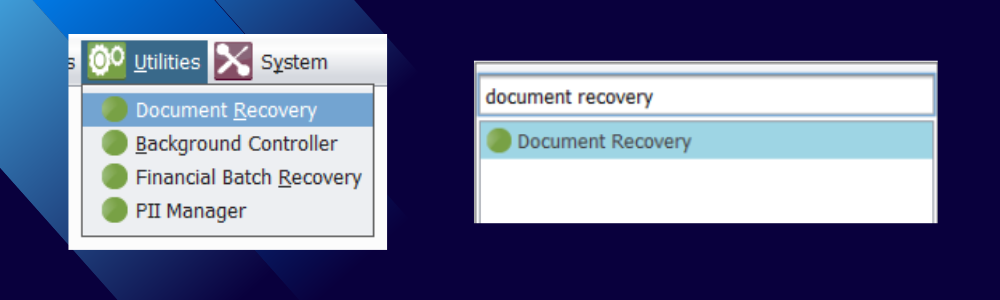
Users can access document recovery in RentalResult through the Utilities menu or by using shortcut search (Ctrl + M). The goal is speed: when a disruption happens, users shouldn’t have to hunt for the tool that helps them resume work.
Recovering a document
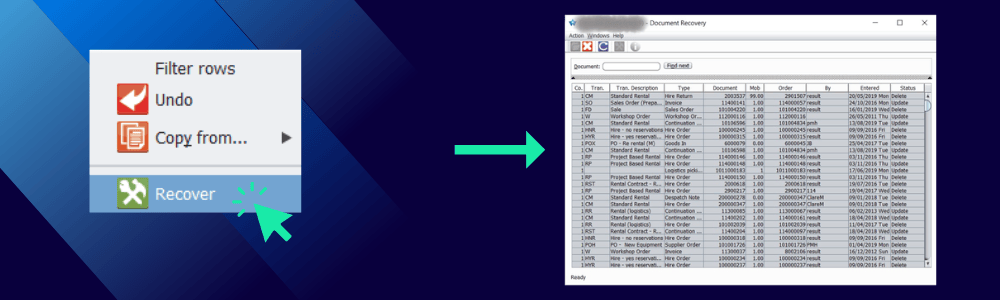
Inside the document recovery section, users can review documents by date or use Document Search for specific document numbers. One practical caution from the original guidance: be careful with documents dated on the current day, since recovering a document that overlaps with active work could create conflicts with other users.
Recovery is typically a simple selection or right-click action. Depending on the document status, the system may either reprocess the document or, in some cases, identify it for deletion.
Handling documents marked for deletion
Documents marked as “Delete” require additional attention. Users may be prompted that new orders cannot be recovered and will be deleted. Before proceeding, it can be worth checking. Document Movement Inquiry to see whether any critical details can be preserved or referenced.
The underlying best practice is straightforward: treat deletions as intentional clean-up, not a reflex. If a document represents meaningful operational work (even if it can’t be fully recovered), capturing details before deletion can reduce downstream confusion.
When Is Document Recovery Most Needed in Construction?
Construction operations are uniquely exposed to interruptions: remote job sites, variable connectivity, and frequent coordination between field and back office teams. Document recovery becomes most valuable in a few predictable situations.
During system updates or restarts
Construction systems undergo updates and occasional restarts. If documents are open during those moments, they can be at risk. Document recovery helps ensure open transactional work isn’t lost, protecting continuity during planned changes.
In cases of network instability
Remote sites and field operations don’t always have consistent connectivity. When a connection drops mid-transaction, the cost isn’t just inconvenience—it’s lost time, rework, and potential data gaps. Document recovery helps preserve transactions so they can be completed once connectivity stabilizes.
For disaster recovery scenarios
In the event of a system failure or significant bug, document recovery supports business continuity by helping restore transactional data quickly. The faster teams can recover in-flight work, the lower the operational and financial impact from downtime.
For daily workflow efficiency
Not every disruption is dramatic. Sometimes a document closes accidentally. Sometimes a user gets interrupted mid-process. Document recovery supports day-to-day efficiency by allowing work to be resumed instead of restarted—keeping execution smooth across dispatch, inventory movement, and transactional processing.
Keep Transactions Clean, Recoverable, and Operationally Reliable
Document recovery might not be the flashiest feature in an equipment system, but it’s one of the most operationally protective. It helps ensure transaction integrity, supports continuity when disruptions happen, and keeps teams from losing progress when time matters most.
For construction organizations running multiple jobs, multiple users, and high transaction volume, features like document recovery become part of how you maintain control at scale—not just how you troubleshoot.
If your team depends on high-volume transactions to keep equipment moving, book a demo to see how RentalResult construction equipment management software supports document recovery and operational continuity—so interruptions don’t turn into lost work, data gaps, or delayed execution.