Every vendor claims integration. Few can show you one. Here is how to tell a live, two-way connection from a scheduled file transfer dressed up as an API, before you sign.
You hold the vote that can stop a purchase. Operations loves the demo, the warehouse wants the mobile app, and the contract is nearly ready. Your job is narrower and harder. You decide whether the new system will talk to your ERP, or quietly double the work of everyone who touches a project.
Most buyers have been burned once. A vendor promised integration, then shipped a nightly export that dropped a spreadsheet into a folder. The data looked connected on the slide. In production, it arrived a day late, out of balance, and impossible to reconcile at month end.
Integration is the line between a system that removes work and one that adds it. Whether you call the category an equipment rental ERP or construction equipment asset management software, the test is the same. The questions below are vendor neutral, and the final section packages them for your RFP.
The short answer
A true equipment rental ERP integration reads and writes both systems through an API, in near real time and in both directions. A scheduled import or export is not integration. Before you buy, confirm which way each data object flows, what triggers status sync, where records are validated, who owns the connector, and how data reaches your warehouse.
In this guide
1. Integration, or import and export? Define it by what you can observe
Ask three vendors if they integrate with your ERP, and three will say yes. The word carries no agreed meaning, so you have to define it by behavior rather than by the sales deck.
A true equipment rental ERP integration connects through an API that reads and writes the actual tables of both systems. A change on one side appears on the other in near real time, in both directions. An import or export moves a file on a schedule. That is data manipulation, not a connection, and the gap between the two surfaces at the worst possible moment.
Looks like integration
- A nightly or hourly job
- Files handed to a folder or inbox
- One direction, with a manual reverse step
- Reconciliation owned by your team
Is actually integration
- Changes propagate in near real time
- API reads and writes both systems’ tables
- Both directions, by design
- The connection reconciles itself
The 60-second test
Ask the vendor to describe exactly what happens in the 60 seconds after someone changes a record. A real integration gives a specific, boring answer. A file transfer gives you a schedule, and a story about why the schedule is fine.
In short. Define integration by observed behavior, not by the word on the slide.
2. What data flows, and in which direction?
Integration is not one connection. It is a set of data objects, each moving in a direction you choose. Map every object before you buy, because a connection that runs the wrong way creates duplicate entry instead of removing it.
Projects and cost codes usually originate in the ERP. As a job is created there, it should flow into the equipment system automatically, so no one rekeys a project number or a phase code. Billing runs the other way. Invoices built against those cost codes should post back to the ERP with enough line detail to satisfy an owner who audits every charge.
Purchase orders are the object people forget to decide. Some firms issue every PO from the ERP and pull it in. Others raise the PO in the equipment system and push the number back. Both work. The failure is leaving the direction undecided until go-live.
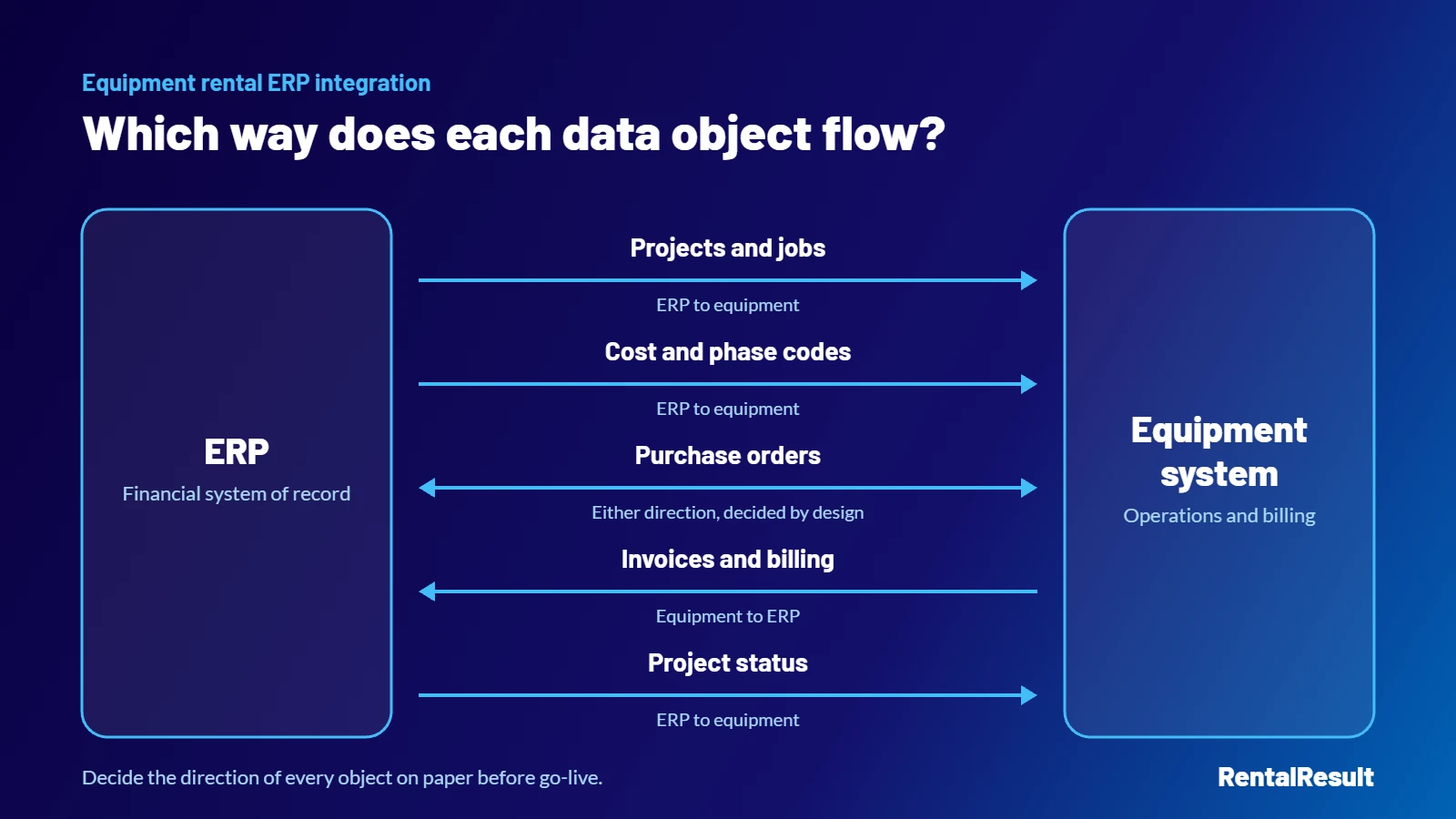
| Data object | Typical direction | Why it matters |
|---|---|---|
| Projects and jobs | ERP to equipment | No rekeying when a job opens |
| Cost and phase codes | ERP to equipment | Charges land on the right budget line |
| Purchase orders | Either, by design | Prevents duplicate or orphaned POs |
| Invoices and billing | Equipment to ERP | Consolidated, line-level detail reaches finance |
| Project status | ERP to equipment | Controls what the field can and cannot do |
In short. List every data object and fix its direction on paper before the first demo ends.
3. Status synchronization: what happens when a project closes
Project status is the quiet controller of the whole system. A job moves from awaiting start, to active, to winding down, to closed. The equipment system should mirror that lifecycle from the ERP, and it should change behavior at each stage.
- Awaiting startMirrored from the ERP
- ActiveBehavior follows status
- Winding downNo new deliveries. On-rent equipment can still come off rent and bill.
- ClosedKnow whether a hard or soft close triggers it
Behavior matters more than the label. When a job winds down, the system should stop new deliveries to that project, while still allowing equipment already on rent to come off rent and bill. A status that changes a color but not what users can do is decoration.
Then ask the question that exposes a weak equipment rental ERP integration. Does status sync trigger on a hard close or a soft close in the ERP, and is the close itself the trigger, or a separate manual step? Teams that cannot answer this learn the answer during their first messy month end.
In short. Status should drive behavior, and you should know exactly which close event moves it.
4. Middleware: your validation and reconciliation checkpoint
A direct, point-to-point connection sounds simpler, and it is, until a bad record arrives. With nothing between the two systems, that record posts straight to your ledger, and you find it during reconciliation.
A middleware layer sits between the equipment system and the ERP as a checkpoint. It validates records, reconciles the two sides, logs every exchange, and retries what fails. Experienced vendors recommend it for exactly these checks and balances. Ask where the connection is validated, and what happens to a record that does not match.
- ValidateRecords are checked before they post
- ReconcileBoth sides are kept in balance
- LogEvery exchange is recorded
- RetryFailed records are sent again
In short. Insist on a place where records are checked before they reach your financials.
5. Who builds the integration, and who owns it after go-live?
Ask who writes the integration, and who fixes it the day your ERP applies an update. A vendor with a pre-built connector, developed and maintained in house, carries that burden with you. A vendor who subcontracts the build hands you a dependency, and a second phone number to call when something breaks.
Press on the word pre-built. A connector already running for other customers is a strong starting point, not a guarantee of plug and play. No two ERP integrations are identical, because no two ERP implementations are identical. Your cost code structure, your close process, and your customizations all shape the work. A credible vendor says this plainly and scopes a discovery step rather than waving it away.
In short. Favor an owned, in-house connector, and distrust any promise that skips discovery.
6. Reporting extensibility, from canned reports to the database
Equipment data earns its value in reporting, so test how far the reporting ladder goes before you hit a wall. The first rung is a library of standard reports. The second is the ability to reconfigure them. The third is fully custom reports and dashboards built to your definitions.
- Standard reportsA library that ships with the system
- Reconfigured reportsAdjust what the standard set shows
- Custom reportsReports and dashboards built to your definitions
- Direct data accessPull raw records through ODBC or an equivalent
The top rung is direct access to the data itself. Ask whether you can connect to the database, through ODBC or an equivalent, and pull raw records out. That access is what lets you combine equipment data with ERP data into a single leadership view, instead of screenshotting two systems into one slide. The same questions apply to broader equipment rental and maintenance software, not only to a single-purpose tool.
In short. Confirm you can reach the raw data, not only the reports the vendor ships.
7. Your data warehouse and BI stack are the real consumer
For most enterprise teams, the ERP is one stop on a longer path. Operational data lands in a warehouse or lake, such as Snowflake or Databricks, and the business reports from a BI and planning layer, such as Power BI or a financial planning tool. The equipment system has to feed that layer, or it becomes an island with good screens and no reach.
- Equipment systemOperational data is created
- ERPOne stop on a longer path
- Warehouse or lakeSuch as Snowflake or Databricks
- BI and planningSuch as Power BI or a planning tool
So widen the integration question beyond the ERP. Ask how the equipment system exposes data to a warehouse, through ODBC, an API, or a scheduled extract into your pipeline. The team that owns the warehouse belongs in the evaluation, not told about the choice afterward.
In short. The warehouse is often the true downstream consumer, so evaluate the feed to it too.
8. The equipment rental ERP questions to put in your RFP
Drawn from the sections above and written to drop into a requirements matrix. Ask for specifics, not yes or no.
- In the 60 seconds after a record changes, what exactly syncs, and in which direction?
- Which connections are a live API, and which are a scheduled file transfer?
- For projects, cost codes, purchase orders, invoices, and status, which way does each object flow?
- How do we decide whether purchase orders originate in the ERP or in your system?
- What project and line-level detail posts back with each invoice?
- Does status sync trigger on a hard close or a soft close, and is the close the trigger or a separate step?
- When a project winds down, what does the system stop allowing, and what does it still permit?
- Do you recommend middleware, and what does it validate, log, and retry?
- Who builds the connector, who maintains it, and what happens when our ERP updates?
- How many live integrations do you run against our specific ERP, and how different were they from each other?
- How far does reporting reach, from canned reports to direct database access through ODBC?
- Where should our data reside and be pulled from, and how do you feed our warehouse and BI tools?
Tip. Score each answer. Specifics earn points. A story about why a schedule is acceptable does not.
The takeaway
Integration depth is a procurement control, not a technical footnote.
By the time a system is live, the cost of a shallow equipment rental ERP connection lands on your team every day, in rekeyed records and month-end cleanup. The 12 questions above move that cost into the evaluation, where it belongs, and where a vendor either answers with specifics or reveals that it cannot.
Keep exploring
RentalResult is construction equipment and rental management software built to integrate with your ERP rather than replace it. See how enterprise contractors keep equipment data and their ERP in sync, without rekeying a single project.