
Every equipment operation that bills projects has two ways to lose money on a rate, and most only watch for one. Undercharge, and revenue quietly disappears. Overcharge, and someone in finance spends a week defending an invoice line by line to a project manager who has already escalated it. Both failures start in the same place: cap and discount rules that live in a spreadsheet, an email thread, or one person’s memory instead of in the equipment rental accounting software that actually produces the invoice.
This piece is for the construction controllers and finance leaders who sign off on those invoices but rarely see how the rates behind them get set. It walks through where margin leaks, why the leak runs in both directions, and what equipment rental accounting software has to do to close it.
In this article
The two-sided risk of manual rate handling
Picture a project agreement with a maximum cap of 100 percent. The person keying the order sees an editable field and types 50 by mistake. The project stops paying halfway to the agreed limit, and nobody notices because no one complains about a bill that is too small. Now flip it. Someone types 120. The project team catches it immediately, because overbilling hits their budget, and the dispute lands on finance.
Call the second cost the defense week: the hours spent pulling delivery records, rate sheets, and emails to justify or correct a charge that should never have been in question. Underbilling is invisible lost revenue. Overbilling is visible lost time and trust. A manual rate process guarantees some of each, and neither shows up as a line on the P&L.
The margin leak runs both ways
Too low: revenue the project agreed to pay never reaches an invoice. Nobody disputes it, so nobody finds it.
Too high: the project disputes the invoice, finance rebuilds the backup by hand, and the relationship with the project team takes the hit.
The common cause: a rate rule that a person has to remember and retype on every order.
Max cap behavior, explained plainly
A maximum cap limits the total rental a project pays for an item to an agreed percentage of a reference value set in the project terms. Once cumulative charges reach the cap, billing for that item stops, even if the equipment stays on site. The cap protects the project from paying more in rent than the equipment is worth to them, and it protects the equipment business from negotiating that limit job by job. The same logic applies to internal equipment rental, where the fleet charges the company’s own projects.
Here is how it behaves on a single excavator. Say the agreed cap works out to $10,000 and the full monthly rate is $1,000. The figures are illustrative; the pattern holds at any rate.
| Scenario | Monthly charge | Month the cap is reached | Total billed |
|---|---|---|---|
| Cap at 100 percent, full rate | $1,000 | Month 10 | $10,000 |
| Cap mistyped as 50 percent | $1,000 | Month 5 | $5,000 ($5,000 never billed) |
| Cap mistyped as 120 percent | $1,000 | Month 12 | $12,000 ($2,000 disputed) |
| Cap at 100 percent, 25 percent rate discount | $750 | Month 14 (partial) | $10,000 |
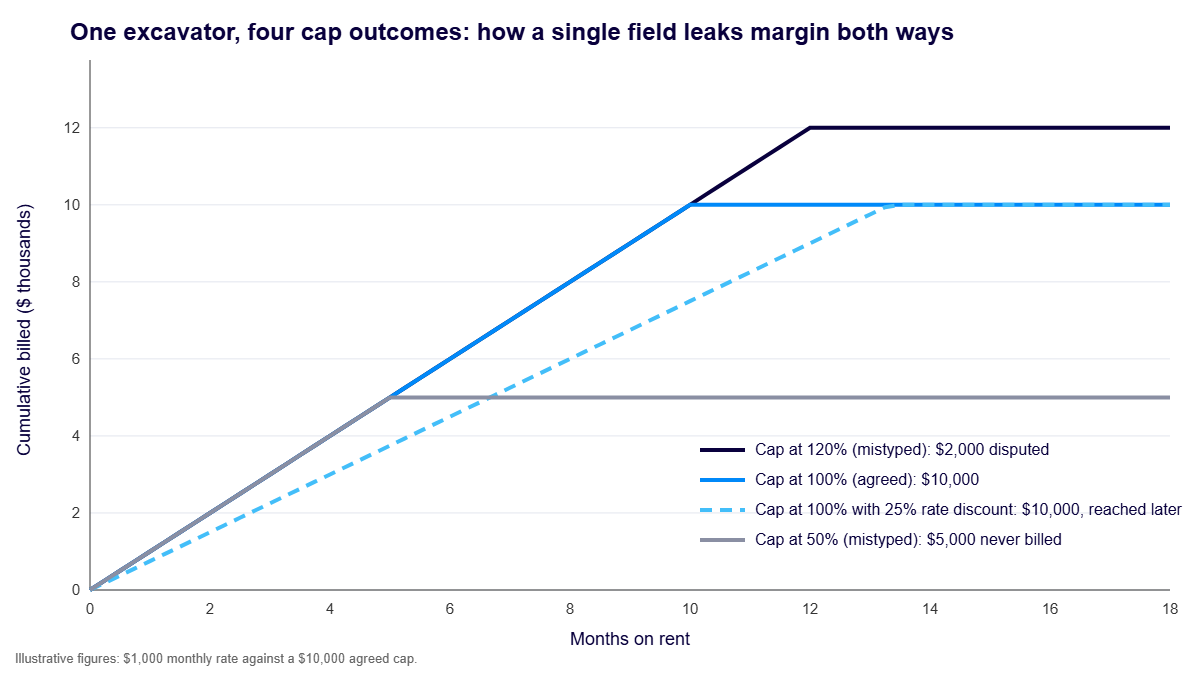
The first three rows show the two-sided risk in numbers. The fourth row shows something less obvious, and it matters for every rate negotiation.
Rate discounts layered on caps, and how they interact over a project
A rate discount lowers the monthly charge. It does not lower the cap. So on a long project, a discounted item simply takes longer to reach the same ceiling. On a two-year job with a 10-month cap, a 25 percent discount changes when billing stops, not how much the project pays in total. On a four-month job that never reaches the cap, the discount is the entire concession.
That changes how finance should evaluate a discount request. Before approving one, ask which limit binds on this project: the rate or the cap. If the cap binds, the discount costs little. If the rate binds, every percentage point comes straight out of margin.
Discounts can also stack in ways nobody intended. In RentalResult, an invoice or billing discount applies after line discounts. An item at 100 dollars a day with a 40 percent line discount bills at 60 dollars. A 10 percent billing discount on that account takes it to 54 dollars. Both may be legitimate. Both should be visible and deliberate, not discovered at quarter end.
Project-level configuration versus order-level editing
Most margin leaks trace back to one design flaw: commercial decisions being made at order entry. The person creating an order should decide what is needed, how many, when, and which cost code it belongs to. They should not be deciding the rate, the cap, or the discount. Those were negotiated once, at the project level, by someone accountable for margin.
| Decision | Set where | Owned by |
|---|---|---|
| Negotiated rates and price lists | Project or account | Finance or commercial lead |
| Maximum cap percentage | Project or account | Finance or commercial lead |
| Maximum discount and approval thresholds | Item category and user role | Controller |
| Billing cycle and order extras | Project and item setup | Finance with operations input |
| Quantity, dates, cost code, delivery address | Order line | Operations or order entry |
Strong rental equipment business software enforces this split, and RentalResult is built around it. Rates resolve through a price list hierarchy, from a customer branch price list down to the company standard list, and the line shows which price list the rate came from. Discount categories set the maximum discount for an item and whether its price can be amended at all, and those item rules override the transaction. Discount approval thresholds can be set by user or by role, so a request above someone’s limit routes to an approver by email or inside the application.
Locked fields as a revenue protection mechanism
A locked field is the cheapest control in any equipment rental accounting software. If the cap, the rate, or the markup on a re-rented item cannot be edited at order entry, it cannot be mistyped at order entry. Grayed-out is not a usability problem. It is the system telling the user that this number was already decided by someone else.
Locking works best with a defined exception path rather than a blanket ban. In RentalResult, an item can be flagged for mandatory discount approval, which sends the entire contract for approval if that line carries any discount at all. The same control closes a common loophole: it prevents users from bypassing discount approval by switching to a miscellaneous item code. Exceptions still happen, but they leave a name, a reason, and an approval on record.
Caps get the same protection. RentalResult records the capping rules on each contract line when the line is first invoiced, and later charges on that line are calculated against those recorded rules, so a change to cap settings afterward cannot quietly alter what the project pays. The recorded rules can be viewed line by line in the Document Movements Inquiry.
Consolidated billing across staggered deliveries and mixed cycles
Projects rarely receive everything on one day. Equipment arrives in waves, some lines bill weekly, others monthly, and re-rented items follow the vendor’s terms. When each delivery produces its own invoice, the project team receives a stack of documents they have to reconcile against their budget, and every mismatch becomes a question for finance.
The fix is to let the equipment rental accounting software do the date math. RentalResult starts charging from the on-rent date on each dispatch, not the date the contract was written, so staggered deliveries bill from the day each item actually arrived. Charging calculations are assigned to the item, so different items on the same project can follow different charging rules, including best rate, rolling calendar month, and 28-day periods. Continuation billing then consolidates invoices according to the bill-by setting on the customer record, so a project can receive one invoice that covers every relevant line at its own rate.
Recurring fees deserve the same treatment. Delivery, pickup, insurance, and environmental charges handled as configured order extras do not need to be recalculated into an effective rate by hand on every line, which is exactly where manual math drifts.
Line-level detail as owner-required invoice backup
Project owners and general contractors increasingly ask for backup on every equipment charge. A summary invoice that says “equipment, March” invites a dispute. An invoice line that carries the item, the project and cost code, the on-rent and off-rent dates, the rate and its source, and any discount applied answers the question before anyone asks it. Equipment rental accounting software should produce that line by default, not on request.
In RentalResult, line-level and billing discounts are visible in the document movement inquiry, project codes can be required at the line level, and drivers capture signatures for deliveries and pickups through the RentalResult Signatures App. When the backup lives with the line, the defense week shrinks to a few minutes of pulling a report.
Project status gating: what can ship versus what can still bill
The end of a project is where leaks multiply. Equipment gets delivered to a job that is winding down. Items stay on rent after the project team believes everything went back. Late charges arrive after the job closed in the accounting system and cannot post anywhere.
Separate the two questions. Can we still deliver to this project? Once a project is coming to an end, the answer should be no without an explicit override. Can we still bill this project? The answer should stay yes until every item is off rent and invoiced. Blocking delivery protects against new exposure. Keeping billing open protects revenue that was already earned. RentalResult holds a status and a finish date on each project record, which gives finance and operations a shared, visible signal for when that switch happens.
A margin leak audit for your equipment rental accounting software
Run this quarterly. Each row takes minutes if the data lives in one system, and days if it lives in spreadsheets, which is itself a finding.
| Check | Where to look | Leak signal | Owner |
|---|---|---|---|
| Cap values match project terms | Active projects with caps | Any cap other than the agreed percentage | Finance |
| Editable commercial fields | Order entry configuration | Rate, cap, or uplift fields open to all users | Controller |
| Discounts above threshold | Discount approval history | Approvals missing or granted by the requester | Controller |
| Stacked discounts | Accounts with billing discounts | Line and billing discounts both applied without a reason | Finance |
| Re-rent markup | Re-rent lines and linked POs | Uplift below target or set to zero | Finance |
| Items past the cap still billing | Long-running projects | Charges after cumulative billing reached the cap | Finance |
| On-rent date accuracy | Dispatch versus first invoice | Billing that starts before or after the actual delivery | Operations |
| Extras applied consistently | Order extras by project | Delivery or fees missing on comparable projects | Operations |
| Deliveries to closing projects | Projects coming to an end | New dispatches without an override | Operations |
| Disputed invoice volume | Credits and rebills | Repeat credits on the same rate or project | Finance |
Stop paying for the same decision twice
Every rate, cap, and discount on a project gets negotiated once. Manual handling makes the business pay for that decision again on every order, either in revenue that never gets billed or in the hours spent defending what did. The right equipment rental accounting software turns those decisions into configuration: set once, locked where it matters, and visible on every invoice line.
How much margin would your last quarter’s invoices show?
See how RentalResult equipment rental accounting software holds caps, discounts, and billing rules at the project level so every invoice line carries its own proof. Explore RentalResult.
Frequently asked questions
What is a maximum cap in equipment rental billing?
A maximum cap limits the total rent a project pays for an item to an agreed percentage of a reference value. Once cumulative charges reach the cap, billing for that item stops, even if the equipment remains on site.
How does a rate discount interact with a rental cap?
A rate discount lowers the periodic charge but not the cap, so a discounted item takes longer to reach the cap. On long projects the total billed can end up the same. On short projects that never reach the cap, the discount reduces revenue directly.
Who should own rental rate and discount settings?
Finance or a commercial lead should own negotiated rates, caps, and discount limits at the project or account level. Order entry should own quantities, dates, and cost codes, with commercial fields locked or routed for approval.
What should equipment rental accounting software control?
At minimum: project-level rates and caps, discount limits with approval routing, billing that starts from actual delivery dates, consolidated invoicing across staggered deliveries, and line-level detail that supports owner backup requirements.
How often should a contractor audit rental billing for margin leaks?
Quarterly is a practical cadence, and equipment rental accounting software that holds the data in one place turns it into a short review. Check cap values, editable fields, discount approvals, re-rent markup, on-rent date accuracy, and credit and rebill volume to find leaks in both directions.