
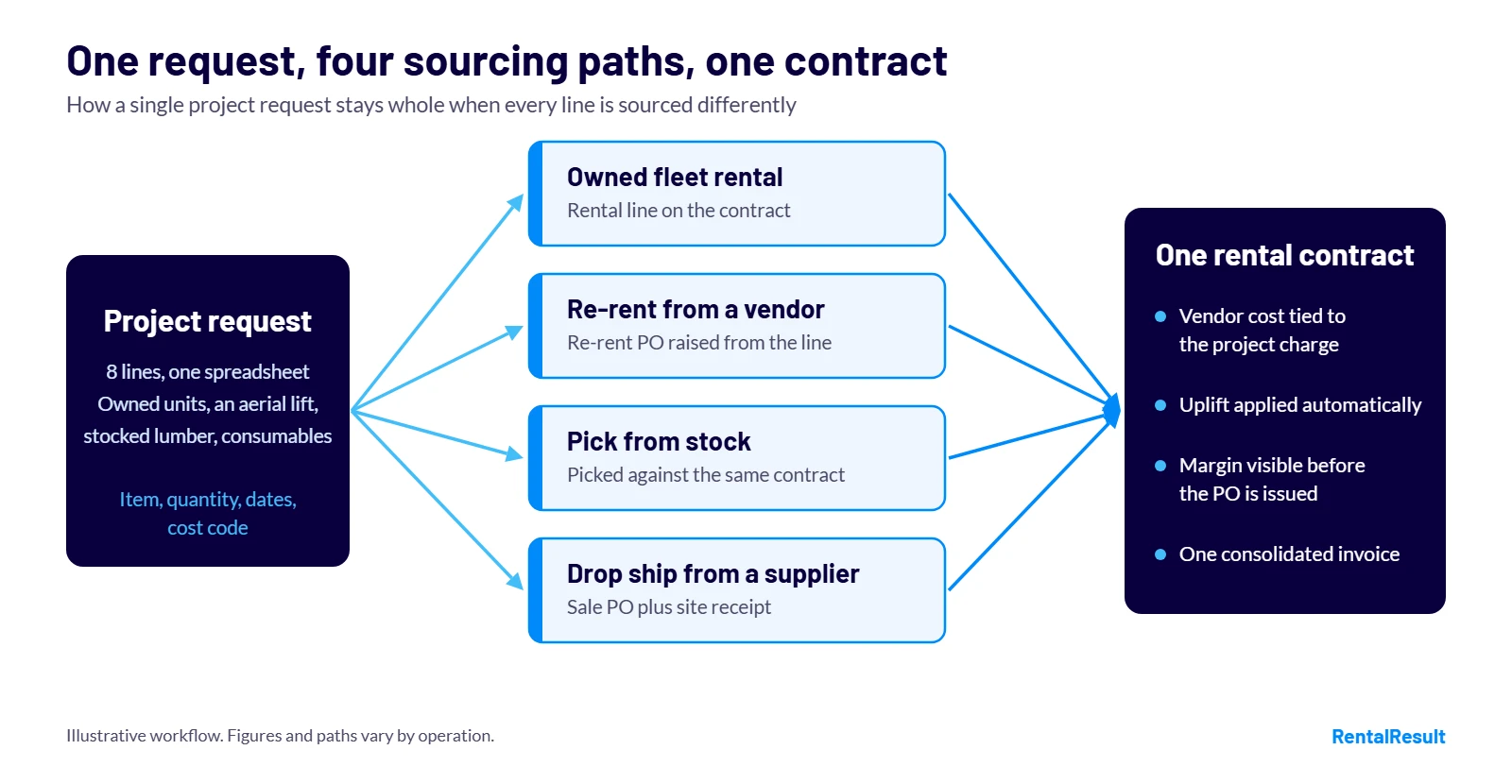
A project team sends over a spreadsheet. Eight lines. Two pieces of equipment the yard owns, one aerial lift the yard does not have anywhere near the job, a pallet of lumber that sits on a shelf in the warehouse, and four consumables nobody stocks. Five minutes later, that one request has become four separate jobs: a rental contract, a re-rent arranged by phone, a pick ticket, and a purchase order typed into the accounting system from someone’s notes.
Nobody designed it that way. It happened one workaround at a time, and it holds together until month end, when someone has to prove that every vendor bill matches a charge to a project. This article is for the equipment, warehouse, and operations leaders who live in that gap. It covers why the four paths split apart, what the split costs, how to re-rent aerial equipment and drop ship consumables without losing margin, and what it takes to fulfill one request on one contract in construction equipment rental management software, including where that model stops working.
The short answer
Drop shipments and re-rents lose margin when they are ordered outside the contract that bills them. The fix is to fulfill every line of a project request on one contract, whether it comes from the owned fleet, a vendor re-rent, warehouse stock, or a supplier drop ship, with the vendor purchase order raised from the line and the margin visible before anyone commits.
In this article
The four fulfillment paths, and why most operations split them
Every line on a project request gets filled one of four ways. The yard rents it from the owned fleet. The yard re-rents it from a local vendor, usually because the owned unit is committed elsewhere or the job is too far away to haul economically. The warehouse picks it from stock. Or someone buys it from a supplier and has it drop shipped straight to site.
| Path | When it wins | What drives the cost | What usually breaks |
|---|---|---|---|
| Owned fleet rental | Unit is available and within economical haul distance | Ownership cost, haul, and idle time | Unit committed to another job when the request lands |
| Re-rent from a vendor | No owned unit, or the job is far from the yard | Vendor rate, delivery and pickup, surcharges | Vendor bill does not match what the project was charged |
| Pick from stock | Item is stocked and the job is in range | Inventory carrying cost and labor | Stock promised to two jobs at once |
| Drop ship from a supplier | Non-stocked consumables and one-off items | Purchase price, freight, and markup | No proof it arrived, and markup applied inconsistently |
Operations split these paths because their tools split them. The rental system knows the fleet. Purchasing lives in the accounting system. The warehouse runs on paper or a tool tracking app. The re-rent lives in a coordinator’s inbox. Each path is reasonable on its own. The trouble starts when one project request has to travel all four.
The pressure on that seam is growing. The American Rental Association forecasts that U.S. construction, industrial, and general tool rental revenue will rise 3.4 percent to $83.5 billion in 2026, as reported by Rental Equipment Register, driven by a preference for renting over ownership. More rented equipment on contractor jobs means more vendor bills that have to match a project charge.
Geography makes it worse. A job 900 miles from the nearest yard turns every owned-fleet request into a sourcing decision: haul the owned unit and absorb the freight, or re-rent aerial equipment and other large units locally and protect the owned fleet for closer work. That decision is a margin decision. When the person making it cannot see the margin, it gets made on habit.
The reconciliation debt that splitting creates
Every split path leaves a seam, and every seam has to be stitched back together by hand. Call it reconciliation debt: work that was skipped at order time and comes due at month end, with interest.
Re-rents are where the debt compounds fastest. When a vendor invoice arrives, it can differ from what the business expected to pay for a long list of reasons:
- The rate on the purchase order was not the rate the vendor quoted by phone.
- The on-rent or off-rent date on the vendor side does not match the date on the project side.
- Suspension days were agreed but never recorded.
- Delivery, pickup, fuel, or surcharge lines appear on the vendor bill and nowhere on the project charge.
- The quantity received is not the quantity ordered.
None of these are exotic. Each one happens because the vendor record and the project record were created separately and never linked. The fix is not a better spreadsheet at month end. It is making sure there is only one record to begin with, which is the core job of construction equipment rental management software.
There is a second, quieter cost. When project teams cannot see what is coming or what it costs, they call, text, and email for status. Every one of those messages is time the warehouse spends answering a question a shared record would have answered on its own.
Go deeper: the Order-to-Bill Gap eBook maps where revenue slips between the moment equipment is ordered and the moment it is invoiced.
Issue the purchase order from the line that created the demand
The single most useful change is also the simplest: the purchase order should come from the contract line, not from a separate screen, a separate system, or a separate person.
When a re-rent or drop ship is raised from the line that created the need, the purchase order inherits what the line already knows: the item, the quantity, the project, the cost code, the delivery address, and the required date. Nobody retypes it, so nobody mistypes it. And the link runs in both directions, so anyone looking at the project charge can see the vendor commitment behind it, and anyone looking at the vendor bill can see the project line it belongs to.
In RentalResult, a user can raise a back-to-back re-rent purchase order directly from a rental contract line, choose the vendor, and add further lines to that same re-rent order later. Purchase orders for sale items work the same way from the contract, so a drop-shipped consumable is ordered from the line that the project will be billed on. When the supplier confirms delivery to site, the receipt is recorded against that purchase order, which closes the loop that drop ships usually leave open.
The drop-ship blind spot
Owned equipment leaves a trail: a pick, a load, a delivery signature. A drop ship skips the yard entirely, so none of that happens by default.
The question to ask: who confirms a drop-shipped item arrived, and where is that confirmation recorded? If the answer is “the site will tell us,” the item is billable on faith.
The fix: treat site confirmation as a receipt against the purchase order, so proof of delivery lives with the line that bills it. Construction rental equipment tracking software should hold that proof as firmly as a delivery signature.
Re-rent aerial equipment with the margin visible before commitment
In construction equipment rental management software, a re-rent should never be a surprise to finance. The moment to know whether a re-rent makes or loses money is before the purchase order goes out, not when the vendor invoice arrives.
That requires three things on the line at the point of decision. First, the vendor rate, pulled from a negotiated price list rather than typed from memory. Second, the markup the business intends to earn. Third, the resulting charge to the project, set against the vendor cost, so the margin is on screen before anyone commits.
RentalResult supports each of these. Preferred vendors can be defined by product group and by branch, and flagged for purchasing, re-renting, or both, so the right vendor is suggested for the right location. Vendor price lists feed the purchase order. Re-rent uplift can be held as a percentage or an amount and applied automatically, following a set order of priority: the item first, then the project, then the ordering account, then the delivery address. Whether a user can override the uplift is a configuration choice, so the markup can be locked for most users and opened for a few.
A worked example: re-renting a 60-foot boom lift
Say the project needs a 60-foot boom lift for three months, and the nearest owned unit is committed. A local vendor quotes $3,000 a month. The project’s re-rent uplift is 15 percent. The line shows a project charge of $3,450 a month and a margin of $450 a month before the purchase order is issued. If the coordinator then gets a better rate on the phone, the change is made on the purchase order, and the margin updates with it. If the vendor rate turns out higher than the project will bear, that is visible too, and it becomes a decision rather than a discovery. The figures are illustrative; the pattern holds at any rate.
| Line item | Per month | Three months |
|---|---|---|
| Vendor re-rent rate | $3,000 | $9,000 |
| Re-rent uplift (15 percent) | $450 | $1,350 |
| Project charge | $3,450 | $10,350 |
| Margin visible before the purchase order | $450 | $1,350 |
Sometimes a re-rent at thin margin is the right call because it keeps a critical job moving. The point is not to forbid it. The point is that someone chooses it with the number in front of them. For a deeper look at re-rent economics, see how re-rent margin erodes in everyday tracking.
Consolidate many lines onto one vendor purchase order
A large mobilization might send twenty lines to the same vendor. Raising twenty purchase orders is clerical work that produces twenty vendor bills to match. One purchase order per vendor per need is cleaner for everyone, including the vendor.
In RentalResult, the back-to-back purchase action at the contract level lists every line eligible for re-rent, lets the user select the ones going to a given vendor, and creates a single re-rent purchase order for all of them. Lines that cannot be re-rented, such as kit headers, are left out automatically. A line added later can be attached to the existing purchase order rather than starting a new one.
Order extras at the contract level: delivery, pickup, insurance, fees, and tax
Vendor rates are rarely the whole vendor bill. Delivery, pickup, fuel, environmental fees, and surcharges arrive with them, and every one is a chance for the vendor cost and the project charge to drift apart.
Start with a policy decision, made once per project rather than once per invoice: are these charges passed through as separate lines, or built into the rental rate? Many contractors build delivery and pickup into the rate so the project sees one number. Others itemize because the owner requires it. Either is defensible. What is not defensible is deciding differently on every order.
Once the policy is set, the system should carry it. RentalResult handles these as order extras: service items attached to the transaction that can be mandatory or optional, default to set quantities and rates, and be raised on dispatch, pickup, return, or invoice, once per contract or each time the event occurs. Insurance can be calculated as a percentage of the rental charge rather than keyed as a flat amount. Because extras are set at the contract level, one delivery charge can cover a truck carrying ten lines, instead of ten delivery charges for one truck.
Where single-contract models break, and what to configure instead
One contract for everything is the right default, not a universal rule. It is worth knowing where it strains.
- Requests that arrive in waves. If a project sends a new request every week, reopening last week’s contract to add lines creates confusion about what was ordered when. A new contract per request is often cleaner.
- Volatile delivery pricing. When fuel prices move, delivery and setup rates move with them. Separate contracts let new rates apply to new work without rewriting old commitments.
- Different approvers or budgets. If self-perform scopes or subcontract packages are approved separately, separate contracts mirror that structure.
The reason none of these is a problem is consolidated billing. In RentalResult, continuation billing consolidates invoices according to the bill-by setting on the customer record, so a project can receive one invoice covering many contracts, each line charged from its own on-rent date at its own rate. Charging rules are assigned to the item, so different items on the same project can follow different rules. Contract structure can follow how requests arrive, while the invoice follows how the project wants to pay.
The other place single-contract models break is the miscellaneous item code. A catch-all code makes a drop ship fast to enter and almost impossible to report on. If the same consumable is drop shipped two hundred times a year across ten projects, nobody notices, because every order is described differently. That is a stocking decision and a vendor negotiation hiding in plain sight. Our piece on why item codes beat miscellaneous codes goes deeper, and the same logic applies to re-rents: the aerial lift you re-rent every month on every job is a fleet gap, not a sourcing preference.
A sourcing path decision matrix
Use this at the point of order, not after. Each question should be answerable from the contract line in construction rental equipment management software. If it takes a phone call, that is the gap to close first.
| Question | If yes | If no |
|---|---|---|
| Is an owned unit available for the full requested window? | Check haul distance before committing it | Re-rent, or reallocate from a job ending early |
| Is the job within economical haul distance of that unit? | Rent from owned fleet | Compare haul cost with a local re-rent |
| Does a preferred vendor serve this branch for this item group? | Use the negotiated rate | Get a quote and record it on the purchase order |
| Is the margin at the project charge acceptable? | Issue the purchase order | Escalate, renegotiate, or accept it as a deliberate decision |
| Is the item stocked and available, not just reserved? | Pick from stock | Drop ship, or back order the shortfall |
| Has this item been drop shipped repeatedly this year? | Create an item code and review stocking | Drop ship on the line with markup applied |
| Do vendor extras follow the project policy? | Let order extras carry them | Fix the policy before the next order |
An implementation sequence for teams changing this workflow
Changing how sourcing works is a process change before it is a software change. Teams that succeed tend to move in this order:
- Agree the policy. Decide markup targets, pass-through rules for vendor extras, and who may override them. Write it down.
- Load the vendor data. Set up preferred vendors by item group and branch, and load negotiated vendor price lists. Without them, every rate is typed from memory.
- Clean up item codes. Create codes for anything ordered regularly, and keep miscellaneous codes for the truly one-off.
- Move purchasing to the line. Raise every re-rent and drop ship from the contract line that created it. Retire the separate purchase order workflow for these items.
- Lock what should not change. Lock uplift and rates for most users, with an approval path for exceptions.
- Close the receipt loop. Record drop-ship deliveries as receipts against the purchase order, using site confirmation.
- Open the front door. Once the back office is solid, give project teams a self-service requisition portal so requests arrive as structured data instead of spreadsheets.
That last step is where the real compounding starts. When project teams request through a job site portal, each request arrives with item, quantity, dates, and cost code already filled in, and the person fulfilling it spends their time on the sourcing decision instead of on data entry.
One request, one record
Drop shipments are not hard because buying things is hard. They are hard because one request gets split into four records that were never meant to meet again. Construction equipment rental management software earns its place when it keeps that request whole: one contract, every line sourced the right way, every vendor commitment tied to the charge it supports, and the margin visible before anyone signs.
See one request travel all four paths on a single contract
Watch RentalResult raise a re-rent, a drop ship, and a stock pick from the same contract, with vendor rates, uplift, and margin on screen before the purchase order goes out.
Frequently asked questions
What is a drop shipment in construction equipment management?
A drop shipment is an item bought from a supplier and delivered straight to the job site without passing through the yard or warehouse. It is common for consumables and items the business does not stock.
How do you re-rent aerial equipment without losing margin?
Raise the re-rent purchase order from the contract line that needs the lift, pull the vendor rate from a negotiated price list, and apply the project’s re-rent uplift automatically. The margin should be on screen before the purchase order is issued, and haul cost from the nearest owned unit should be compared with the local re-rent first.
What is a back-to-back re-rent?
A back-to-back re-rent is equipment rented from an outside vendor specifically to fill a line on a project contract. The vendor purchase order is tied to that contract line, so the cost and the project charge stay linked.
Can rentals, re-rents, stock items, and drop ships go on one contract?
Yes. In RentalResult, rental and sale items can sit on the same rental contract, and re-rent and purchase orders are raised from the individual lines, so one request can be fulfilled four ways on one contract.
How should markup on re-rented equipment be managed?
Set a re-rent uplift as a percentage or amount at the item, project, or account level, apply it automatically when the purchase order is created, and limit who can override it. The margin should be visible on the line before the purchase order is issued.
What should construction equipment rental management software do for drop ships and re-rents?
At minimum: raise purchase orders from contract lines, suggest preferred vendors by branch, apply vendor rates and markup automatically, consolidate lines onto one vendor purchase order, carry delivery and other extras by policy, and record delivery receipts against the purchase order.